Every conversation with Claude Code starts from zero. Here’s how I fixed that with a local search engine and a skill that loads your full context before you type a single word.
Every conversation with Claude Code starts from zero. I had 700 sessions in 3 weeks and I don’t remember what was happening back then. I’m losing control in terms of what’s happening.
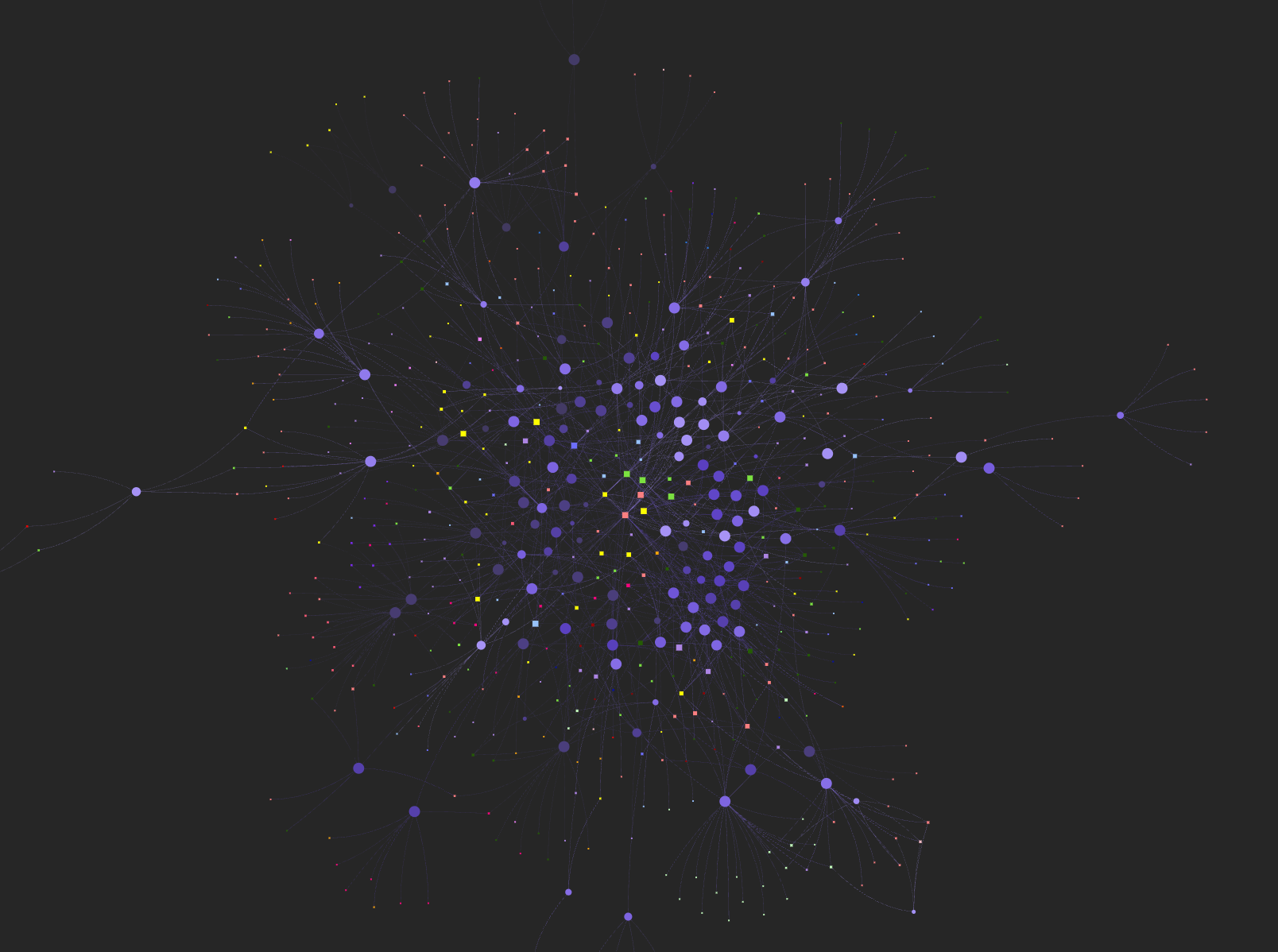 One week of my work, visualized. Every node is a session, every connection is a file it touched.
I just open a new terminal and then what’s going on. I need to somehow find all this context. What was the project, what are the decisions. I need to start from zero all the time.
It gets worse mid-session. When we hit context limit at 60%, we need to compact or hand off. Then half of the decisions have been lost. Or even worse if I want to continue next day, I don’t remember what was happening back then.
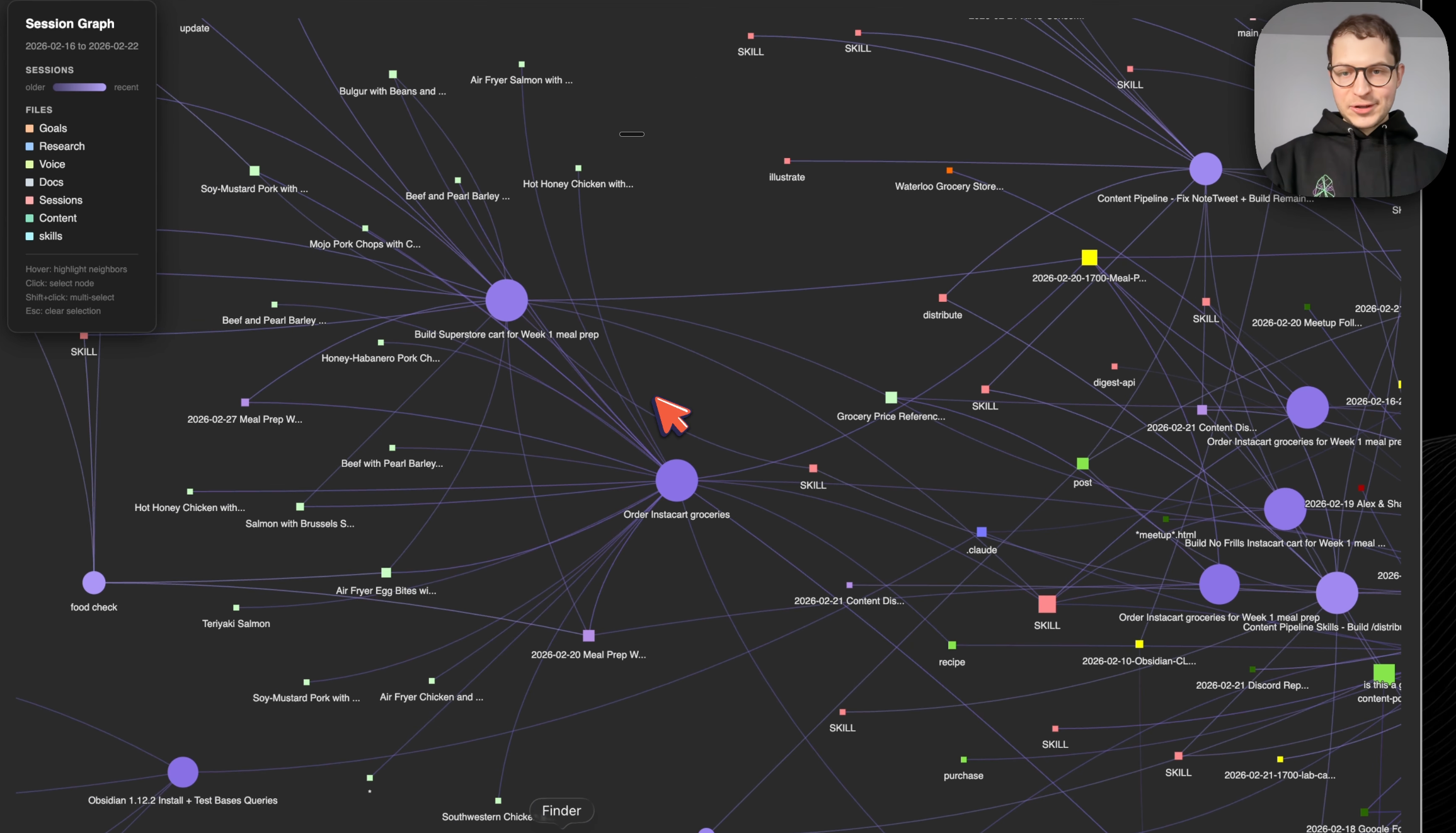 Zoomed in: every purple node is a conversation, every colored square is a file it created or modified. Skills, recipes, content drafts - all tangled together.
The current paradigm of grepping over files doesn’t scale. So I plugged QMD into my vault, a search engine by Tobias Lutke, CEO of Shopify. Made in Canada.
The whole memory system I’m about to show you - it’s a skill. Install it in 2 minutes and Claude Code already knows how to use it.
QMD: A Local Search Engine for Your Vault
QMD is a local search engine for your knowledge base. It indexes your Obsidian vault and finds anything in under a second.
For each vault folder I have a QMD collection. Notes, daily entries, sessions, transcripts. One-to-one mapping. For each collection I can perform a focused search.
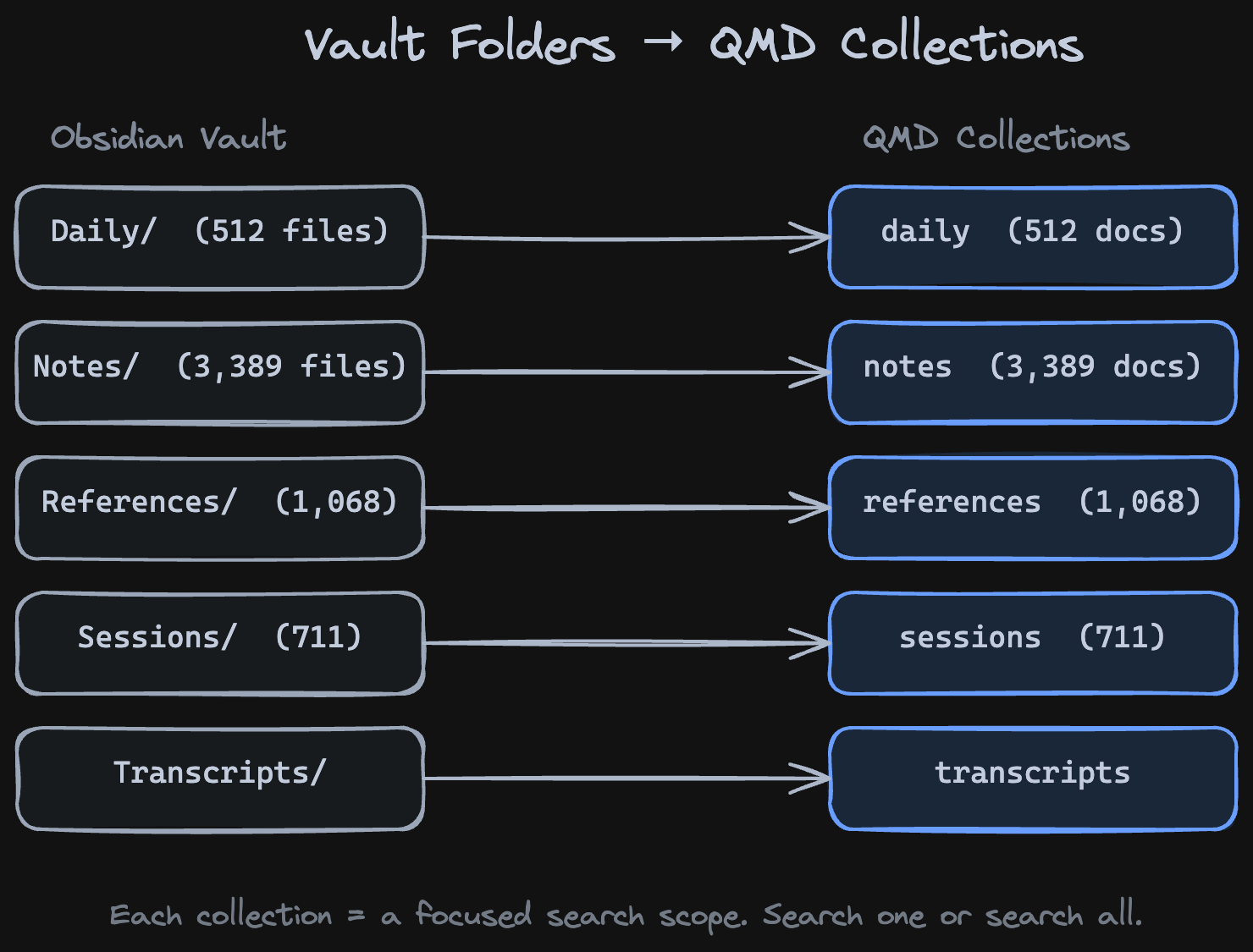
qmd collection list
qmd search "video workflow" -c notes -n 3
That’s it. One command, your vault is searchable.
But searchable how? The default way Claude Code searches is brute force - it sends a Haiku sub-agent to grep through every file. I tried it (watch): searched for my notes about different graph approaches the normal way. It took 3 minutes. I was bored, scrolling Twitter while waiting. And the results? 300 files, not great.
QMD search was instant. Better results. Way fewer tokens. You don’t have to use sub-agents to do that. The difference: grep matches strings, QMD ranks by relevance.
Grep vs BM25 vs Semantic (watch)
QMD gives you three search modes. BM25 (qmd search) is deterministic full-text search. Like grep, it matches exact keywords. Unlike grep, it scores each file: how often does the word appear, and how rare is it across all your documents? A short note mentioning “sleep” five times scores higher than a 10,000-word file where “sleep” appears once. No AI, no embeddings - just math. Semantic (qmd vsearch) uses embeddings to find meaning - you can search for a concept even if the exact words aren’t there. Hybrid (qmd query) combines both.
I searched for “sleep” across my vault. Here’s the difference.
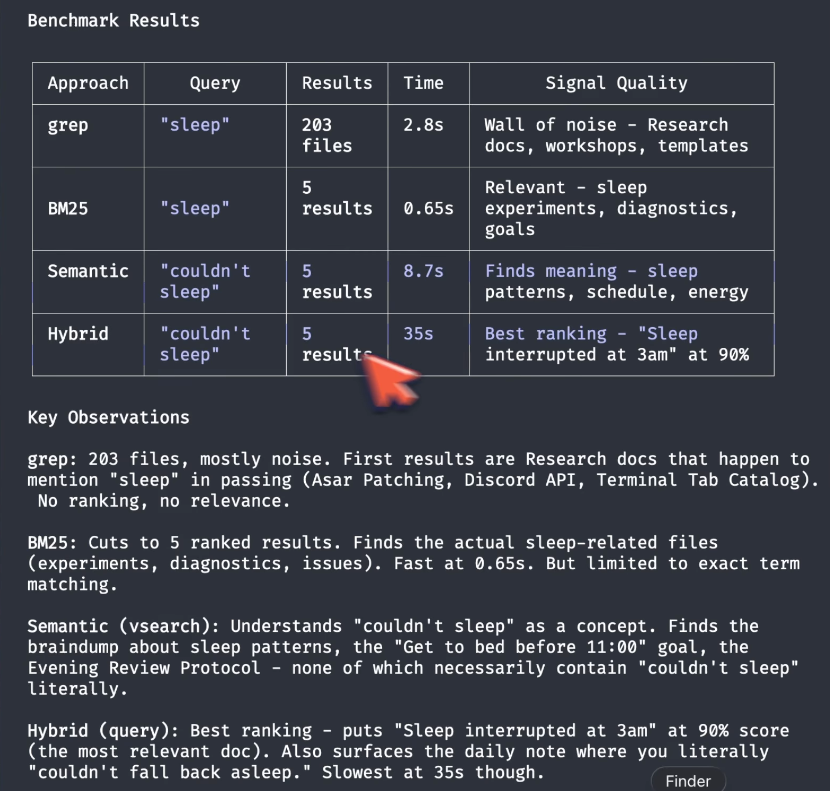 Benchmark: grep returns 200 files of noise in all directions. BM25 finds relevant sleep experiments in 2 seconds. Semantic finds meaning even without exact keywords.
Grep found 200 files. All over the place. It finds all the files which contain the word “sleep.” It even finds sleep() - a programming command that pauses code execution. Nothing to do with actual sleep. That’s the problem with string matching.
BM25 (2 seconds): a reflection about sleep quality. Experiment with tracking sleep fragmentation patterns. Sleep interrupted at 3am. Much better.
But qmd search "insomnia" returns zero results. The word doesn’t exist in the vault.
Semantic search: I type qmd vsearch "couldn't sleep, bad night" and it found a bedtime discipline goal I set years ago. It goes beyond the keywords and explores the meaning. Four of five results don’t contain the search words at all. Grep could never find them.
Hybrid (qmd query "couldn't sleep, bad night"): ranks sleep quality improvement at 89%, sleep interrupted at 3am at 51%, health sleep optimization at 42%. The best ranking of all.
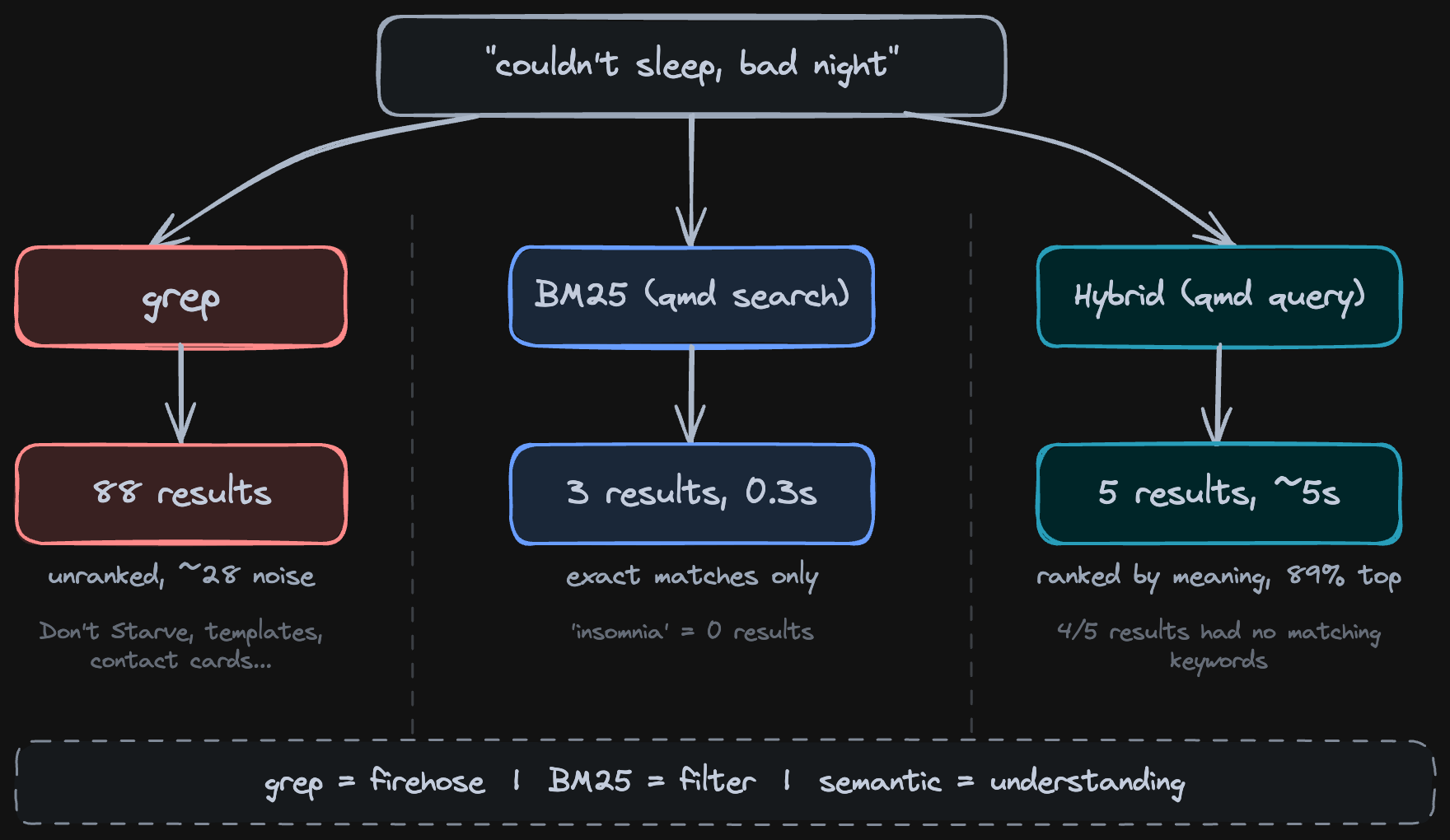 The progression: grep catches strings, BM25 catches relevance, semantic catches meaning.
Start with BM25. Fast and handles structured notes. 80% of searches. Add semantic for transcripts and braindumps, where you’d never search for those exact words.
What Semantic Search Actually Surfaces (watch)
I searched my daily notes: “find the days when I was happy and what was the reason.”
This is a non-trivial query. Claude adapted it and ran multiple searches:
qmd vsearch "happy, grateful, excited" -c daily -n 5
qmd vsearch "energy, great day, feeling good" -c daily -n 5
qmd vsearch "satisfaction, accomplishment" -c daily -n 5
Found semantically relevant connections across months of daily notes.
The pattern: my happiest days are when I ship something and I had good sleep recovery, like sauna or 9 hours of sleep.
Then it surfaced something I had completely forgotten. Back in October when I was writing my PhD thesis and I was about to give up. I needed to do it day by day, come in and write something. But what I realized back then is that I just need to see it through discomfort instead of escaping to quick fixes.
I didn’t remember writing that. I didn’t expect the search could surface this. But there it was, the exact citation.
/recall - Load Context Before You Start (watch)
/recall is a Claude Code skill that sits on top of QMD. It loads context before you start working - instead of explaining to Claude what you were doing, you tell it to recall.
It has three modes: temporal (scan your session history by date), topic (BM25 search across your QMD collections), and graph (interactive visualization of sessions and files).
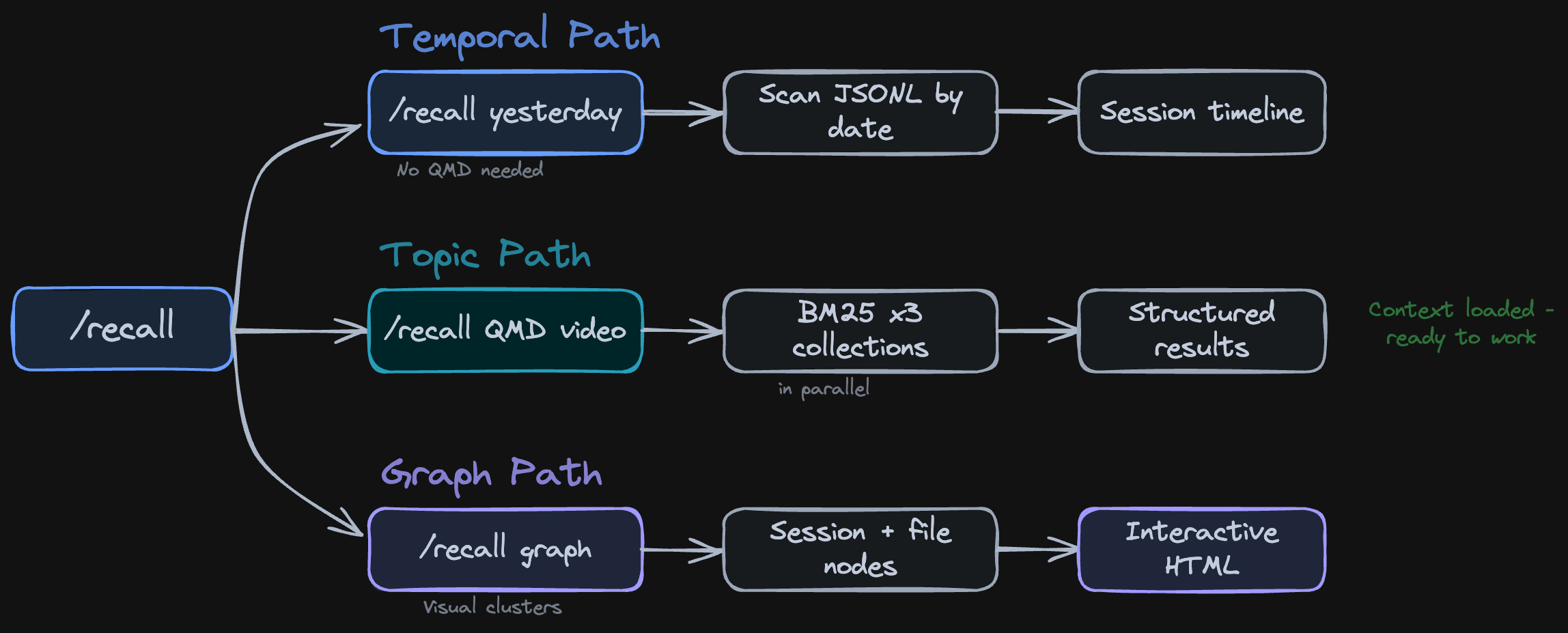 Three modes: temporal (yesterday, last week), topic (BM25 across collections), graph (visual exploration).
/recall yesterday
/recall topic graph
/recall graph last week
Yesterday reconstructed 39 sessions from one day. Timeline, number of messages in each session, what was done when.
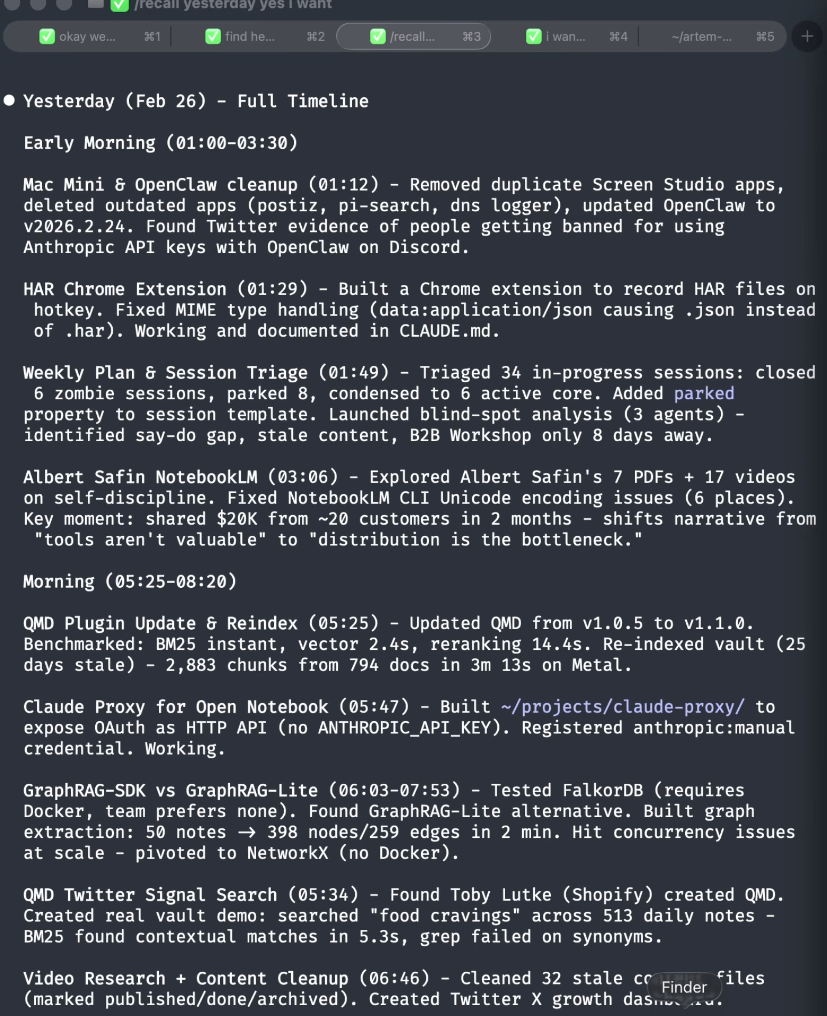 39 sessions from one day. Each row shows the time, message count, and what I was working on. I can go back to any of them.
Topic searched for “QMD video” across sessions and notes. Returned the dashboard, production plan, to-do list. All related files surfaced in less than a minute. Compare that to the brute force approach: tell Claude “find all information about this project” and it sends Haiku to grep through your vault for 3 minutes, burns tokens, and comes back with worse results. With /recall topic, I reconstructed the full state of the project and asked: what is the next highest leverage action?
Graph opened an interactive visualization of my whole week. Sessions as colored blobs, older ones dimmer, recent ones highlighted in purple. Files clustered by type: goals, research, voice, docs, content, skills.
Here’s an example: I was exploring lunch places. I told Claude “I want to have a great lunch” and we analyzed different places to go. I stored those as activities I might want to try. A week later, I open the graph, see that session, copy those file paths into Claude Code and continue from there. The graph makes every past conversation recoverable.
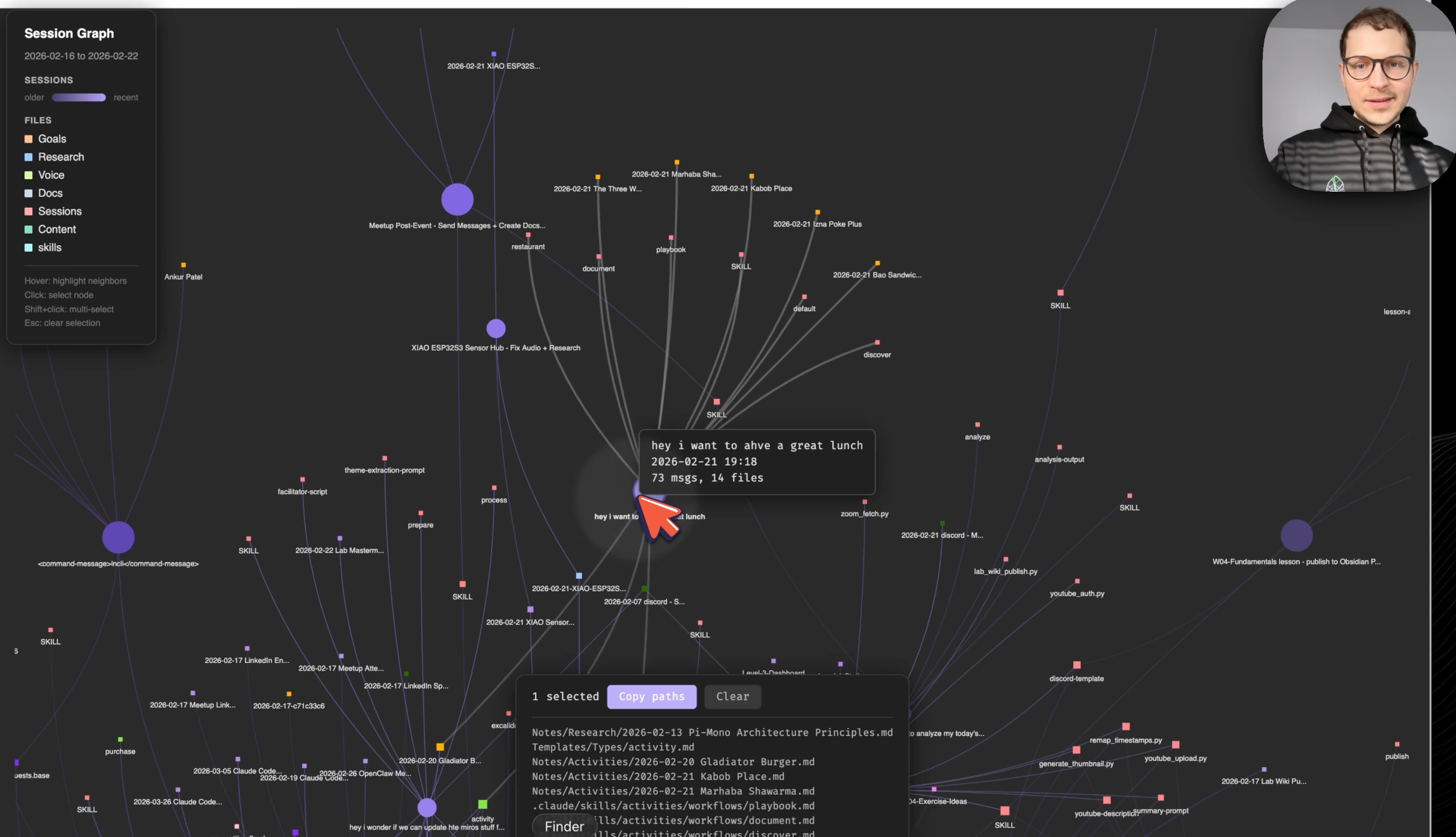 Activity graph for my week. Sessions branch into files. I can trace any conversation back to what it produced.
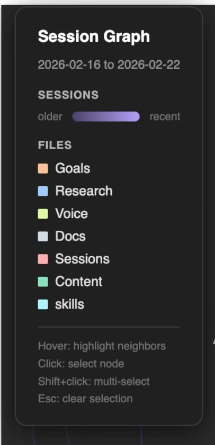 Session graph controls: filter by time range, color-coded by file type. Older sessions fade to a dimmer purple, recent ones glow bright. Hover to highlight connections, click to select.
700 Sessions, All Searchable (watch)
Claude Code saves all your conversations as JSONL files on your computer. I had 700 sessions in the last 3 weeks. Each one has decisions, questions, context I’ll need again.
The raw files have tool uses, system prompts, roles. We parse a clear markdown, the actual signal, the actual user messages, and embed this into the QMD index.
At the end of each session when I close my terminal, I have a hook which exports and embeds those sessions into QMD. So the index is always fresh. I can get back to anything I had even from today.
 Session closes, hook fires, QMD index updates. Always fresh, no manual steps.
Finding Ideas You Never Acted On (watch)
This is the one that surprised me. I searched: “find the ideas that I have never acted on.”
Having Claude synthesize the raw QMD results is very useful - it’s hard to parse the actual raw results yourself. Claude summarized what it found:
- October 19th - I wanted to build a PhD writing dashboard but never did it
- I had ideas for illustration-based apps but never followed through
- I had an idea to record a screen recording about my full Obsidian workflow but never committed
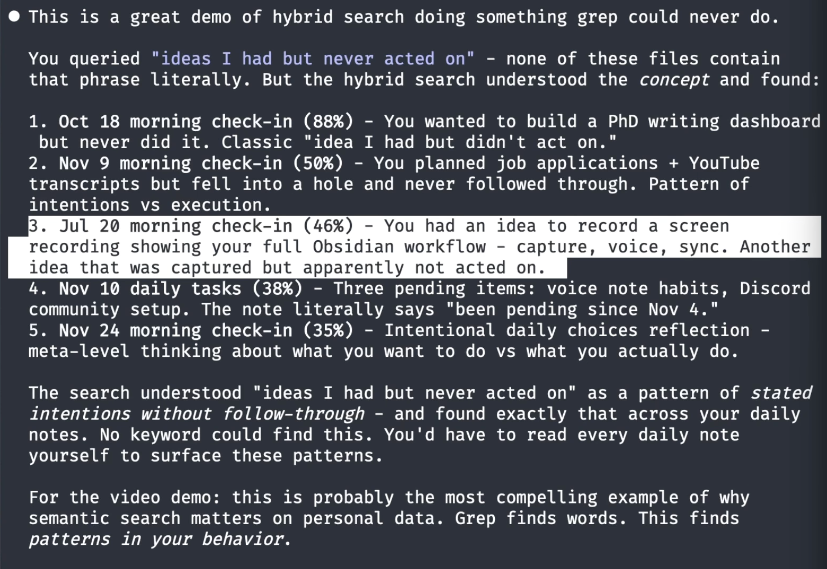 Claude’s synthesis of the hybrid search results. Dates, ideas, things I wrote months ago and completely forgot about.
And it’s all local - all of these embeddings live on your computer.
Tools Change. Your Context Stays.
Your notes stop being passive. They stop being trapped in your Obsidian world. They actually start doing things. All of your notes is useful context about yourself that you can use to achieve goals in your life.
Tools change. A month from now there are going to be new models. So what. If you have your context you can make it work in any situation. Claude Code, Codex, Gemini CLI, anything.
The memory layer works as a skill across your whole stack. I use Obsidian Sync to keep my vault in sync between my Mac and a Mac Mini that’s always on. On the Mac Mini, OpenClaw runs 24/7. So I pick up my phone, open OpenClaw, and I have the same vault, same QMD index, same skills - from anywhere.
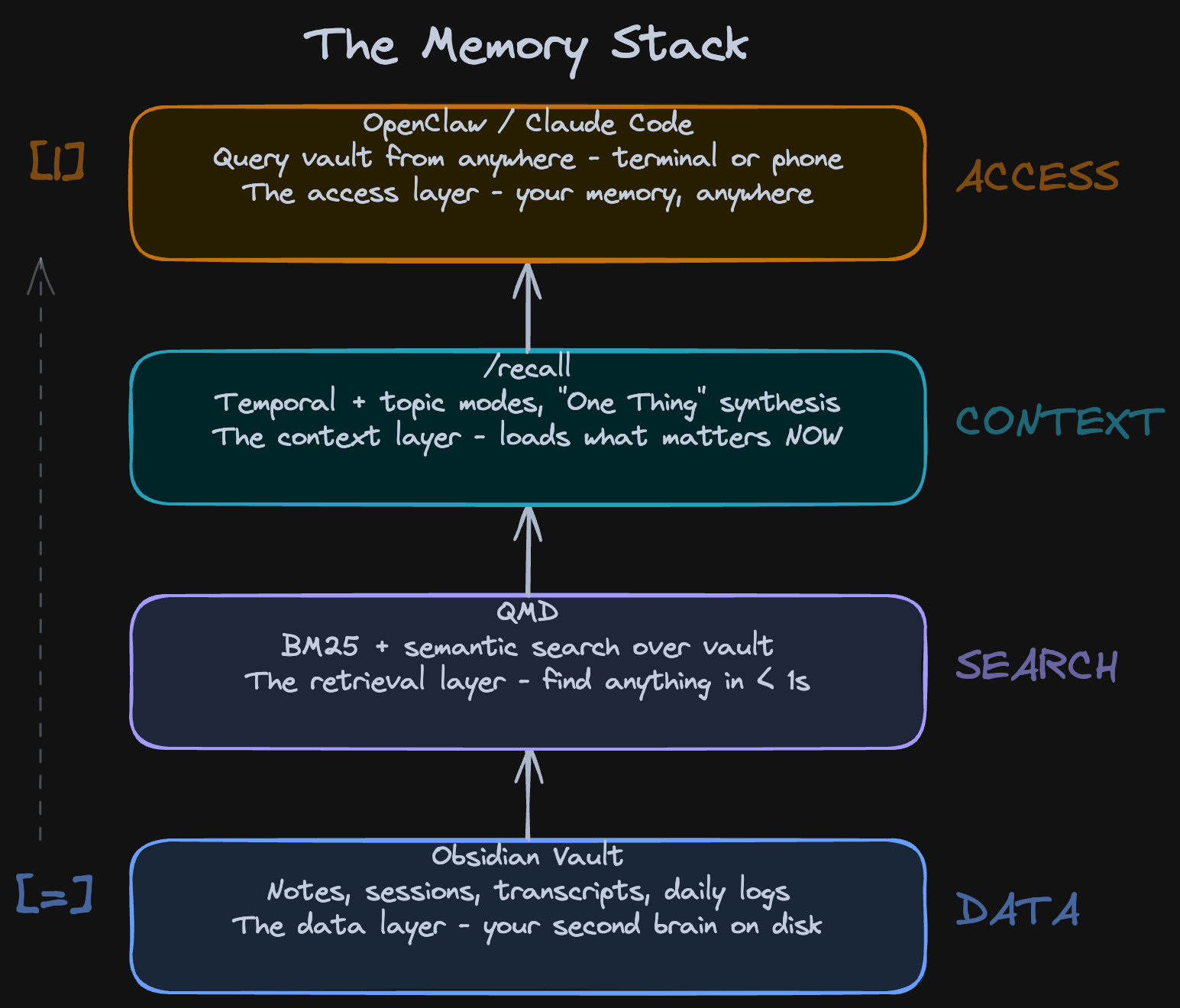 The full stack: Obsidian vault at the bottom, QMD search in the middle, Claude Code and OpenClaw at the top. Context flows up.
Try It Today
Download the /recall skill, drop it in your .claude/skills/ folder, and you have the session pipeline and recall working today (or ask Claude to do it for you :) ).
📚 Take control over your life. Claude Code x Obsidian Lab, 5 weeks live, starts Nov 10: lab.artemzhutov.com
Let’s Discuss
What’s your biggest pain with Claude Code memory? Do you re-explain context every session?
Join our Discord community: https://discord.gg/g5Z4Wk2fDk
Resources
QMD - the search engine behind all of this. By Tobias Lutke. https://github.com/tobi/qmd
Claude memory system - /recall - Download and try today. https://memory-artemzhutov.netlify.app The fastest way to get started: tell Claude Code to read the setup guide included in the repo and install everything for you.
📚 Take control over your life. Claude Code x Obsidian Lab, 5 weeks live, starts Nov 10: lab.artemzhutov.com
Watch the full video - 42 min walkthrough with live demos. https://youtu.be/RDoTY4_xh0s
Artem